
Automatic Validation of IDS Files: How It Works Step by Step
Discover the simple steps to validate a BIM project with the IDS standard and automate the control of the information requirements of the IFC model

In BIM, model quality is defined less by geometry alone and more by the reliability, completeness, and consistency of its data. Yet verifying that information manually is time-consuming, repetitive, and inevitably vulnerable to oversight.
This is where IDS (Information Delivery Specification) becomes essential. It provides a standardized way to translate project information requirements into a structured, machine-readable format. Instead of relying on manual checks, data validation can be automated—making it faster, more objective, and consistently repeatable.
But what does this automation actually look like in practice? How do software tools interpret and enforce these requirements?
To answer that, it helps to move beyond theory and look at the process operationally—using dedicated verification tools such as IDS validators, which can automatically assess BIM models against predefined information requirements.
Contents
What is automatic validation with IDS?
Automatic validation with IDS is the process that enables the automatic verification of whether a BIM model contains all the required information and in the correct format, according to predefined requirements.
This is made possible by IDS (Information Delivery Specification) files, which transform the informational needs of a project into structured and readable rules for software. Essentially, the IDS specifies what must be present in the model, where, and with what characteristics, allowing control programs to compare these requirements with the data actually contained in the IFC file.
The result is an objective and repeatable verification system that replaces manual checks with an automated process capable of quickly analyzing large amounts of data.
In this way, automatic validation with IDS becomes a fundamental tool for ensuring:
- the quality of information;
- compliance with standards;
- alignment among the different stakeholders in the BIM process.
The logic of IDS rules: applicability and requirements
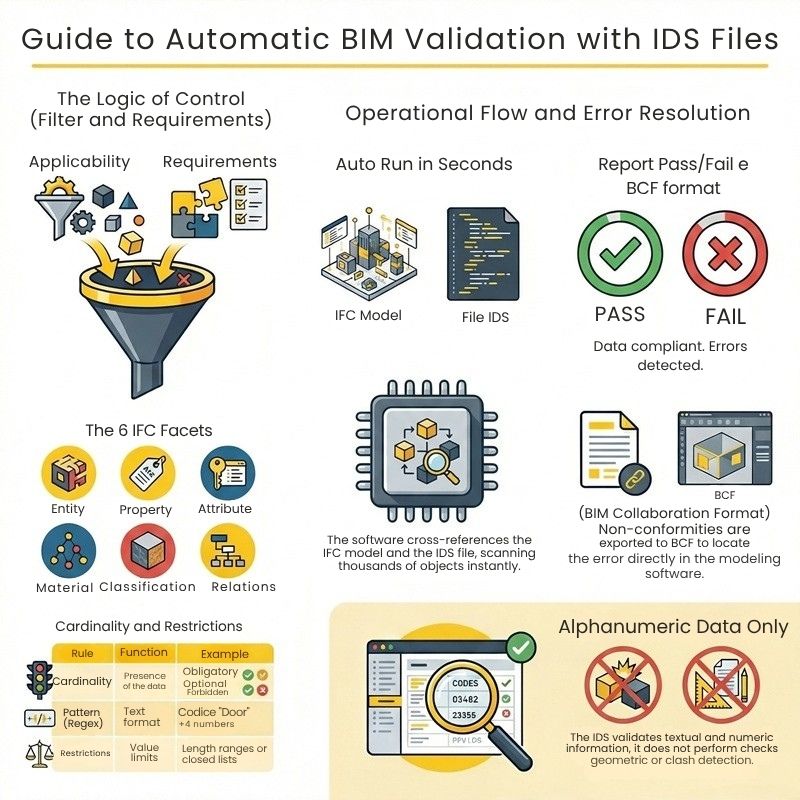
The operation of IDS (Information Delivery Specification) files for automatic validation is based on a fundamental principle: to translate the information requirements of a project into a structured format (XML) that is readable and interpretable not only by humans but especially by computers. This approach allows for the transformation of slow manual checks prone to errors into automated and instantaneous verifications.
Within an IDS file, each individual control rule is defined as a “Specification”. To enable the software to perform validation, each “Specification” is divided into two key components that function as a “filter” and a “question”:
- applicability (filter): tells the computer which elements of the model it should fetch and analyze. For instance, “applicability” can instruct the software to select “all exterior walls” or “all doors on the first floor”.
- requirements: tells the computer what exact conditions those filtered elements must meet to pass the test. For example, it can require that the filtered walls possess a specific property “Fire Resistance” with a value of “REI 60”.
To define both applicability and requirements, the IDS uses Facets, which are 6 categories of characteristics of the IFC standard: Entity (IFC Class), Attribute, Property, Classification, Material, and Relationships (Part of / PartOf).
Advanced rules: cardinality and automatic checks
To make automatic validation infallible and unambiguous, IDS files support advanced logical rules:
- cardinality: it is possible to set whether an information is Mandatory, Optional, or Prohibited. The software will then know whether to flag an error for a missing data point or, conversely, to flag an error for a data that should not exist;
- restrictions and patterns: the computer does not merely check if a field is filled in; it checks the accuracy of the data using regular expressions (Regex), minimum/maximum limits, or closed value lists. It can automatically check if an alphanumeric code follows the correct nomenclature (e.g., “Door” followed by a space and 4 numbers) or if a length falls within an allowed range.
How IDS validation occurs in BIM software
The practical process of validation takes place in a few simple steps:
- upload: the user uploads the 3D model (in open IFC format) and the XML file containing the IDS into a validation software (such as usBIM.IDS, Solibri, BIMcollab Zoom, or Blender).
- automatic execution: the software performs a cross-check. The intelligence of the program scans thousands of objects and their properties in just a few seconds;
- Pass/Fail report: the system returns a report indicating in red the elements that failed the check, providing an immediate overview of non-conformities (e.g., incorrect data type, missing value, wrong unit of measure).
Automated error management with BCF
The real advantage of IDS automatic validation emerges in error management. The issues detected by the software are not returned in a simple text sheet, but are automatically exported in the standard BCF (BIM Collaboration Format).
This format tracks the error in a georeferenced and 3D object-based manner: the modeler receives the BCF file, clicks on it from their modeling software (e.g., Revit or Archicad), and the camera takes them exactly to the incorrect object, allowing them to correct the error instantly.
IDS Validation
What IDS Validation Does Not Do
To truly understand the role of IDS files within the BIM process, it is essential to clarify their operational limits.
Automatic validation through IDS focuses exclusively on alphanumeric data and information, meaning everything related to properties, attributes, classifications, and informational requirements of the objects present in the model.
This means that an IDS file is perfectly capable of verifying, for example:
- the presence of a mandatory property;
- the correctness of a value (such as fire resistance or an identification code);
- compliance with a predefined information standard.
However, IDS does not operate on the geometry of the model. Therefore, it is not possible to use IDS validation for checks such as:
- clash detection (interference between elements, for example between systems and structures);
- checks of distances or clearances;
- spatial or topological checks between objects.
For this reason, IDS validation must be integrated with other BIM tools dedicated to model checking and BIM Clash Detection Software, within a broader and more comprehensive control workflow. Only by combining informational and geometric checks is it possible to ensure a truly reliable model, both from the data perspective and the design perspective.


