
Document Workflow in a CDE: Managing Files and Processes Under ISO 19650
Learn how document workflows in a Common Data Environment (CDE) support ISO 19650 compliance by managing files, roles, revisions, reviews, and approvals through structured, traceable, and repeatable processes.
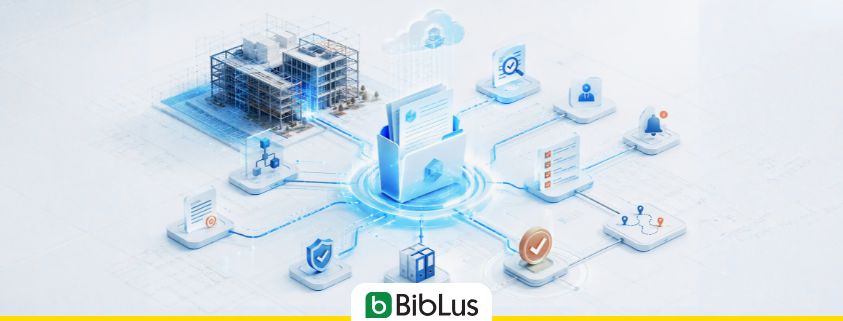
In the traditional AEC workflow, document approval processes are often managed through a series of manual and disconnected steps. A document is created, attached to an email, sent for review, revised based on feedback received through multiple channels, uploaded to a shared folder, and circulated again for further approval. As projects grow in size and complexity, this approach quickly becomes inefficient and difficult to control. The process lacks transparency, traceability, and consistency. It relies heavily on individual actions and memory, making it easy for reviews to be delayed, comments to be overlooked, or document versions to become misaligned.
In a CDE compliant with ISO 19650 principles, document workflows serve to overcome this logic: they are structured operational flows that guide the informational container through verification, revision, approval, data compilation, and eventual publication activities. They can be triggered by uploading a file, a new revision, a change of status, or an action from the user, and are composed of sequential steps, responsible parties, associated forms, progression conditions, and notifications.
The central point is that the file is no longer just an object to be archived; it becomes the trigger for a governed, trackable, and repeatable process.
If the states of the container indicate where the information is in the lifecycle — WIP, Shared, Published, Archived — the document workflow describes how the container progresses from one state to another, who must intervene, what checks must be performed, and what evidence must remain in the audit trail.
In this article, we delve into the details of what a document workflow is in a CDE, how it is configured, which patterns are effective, and how the most mature CDE platforms transform the file into an active engine of the process.
Contents
- The paradigm: from file as object to file as event
- Anatomy of a CDE Document Workflow
- The CRA Process: Check, Review, Approve
- Predefined workflows: the organization’s process library
- Role-based workflows: standardize without rigidity
- Modules Associated with Workflows: Structured Data Collection
- Revision Management: Workflows and New Versions
- Recurring workflow patterns in the AEC industry
- Free tool to design your workflows
- How an advanced CDE implements document workflows
- The CDE as an ecosystem: workflows in the real platforms
- Common mistakes in implementing document workflows
- Frequently asked questions (FAQ)
- Essential Glossary
The paradigm: from file as object to file as event
The conceptual leap that document workflows introduce is radical. In the traditional model, the file is an object: it exists, it is read, it is modified, it is archived. In the CDE ISO 19650 model, the file is an event: its upload underlies a process, its change of state produces notifications, its revision activates new steps.
This paradigm has profound operational implications.
The file activates a workflow
An advanced CDE platform transforms every document into an active element of the process. The uploaded file activates a workflow — a structured operational flow that guides checks, controls, approvals, and compilations.
Users can choose from predefined workflows configured according to the organization’s processes and start them with a simple action. Once launched, the workflow is directly linked to the informational container and accompanies all operational phases, with a clear visualization of the progress status.
Each step has an involved party
For each step of the workflow, the involved parties are identified, who receive a notification and can immediately access the file, operational instructions, and activities relevant to them. No ambiguity about “who does what”: the task is assigned explicitly and tracked.
The process is repeatable and standardized
Unlike email management, a workflow defined in the CDE is repeatable. The same structural verification procedure, for example, can be applied to all structural informational containers of all projects within the organization, ensuring consistency of the process.
Anatomy of a CDE Document Workflow
A document workflow in a CDE compliant with ISO 19650 consists of recurring structural elements. Understanding them is the first step to designing effective workflows.
The Trigger: What Activates the Workflow
The trigger is the event that starts the process. It can be:
- loading of a new information container – the most common trigger. The file is deposited in a folder of the CDE, and this activates the workflow associated with that type of content;
- loading of a new revision – a specific variant: the file already exists, but loading a new version activates a new verification cycle;
- manual status change – the Task Team declares the container “ready for Shared,” triggering the interdisciplinary verification process;
- time expiration – some workflows are scheduled on a time basis, such as a monthly periodic verification of certain content;
- user action – explicit request for approval, review, or phase closure.
The Steps: The Stages of the Process
Each workflow consists of sequential steps (or parallel ones in more sophisticated workflows). Each step has:
- a responsible person – a user or role that must take action;
- a required action – verification, review, approval, form completion;
- a progress condition – what must happen for the next step to occur;
- a maximum time (optional) – SLA beyond which an escalation occurs;
- associated forms (optional) – checklists, verification sheets, structured data to be collected.
The Transitions: How to Move from One Step to Another
Transitions are not automatic: they result from explicit actions by the responsible individuals. In a typical CRA workflow:
- approve: the container moves to the next step;
- request changes: the container returns to the Task Team with comments;
- reject: the workflow closes with a negative outcome;
- delegate: the responsibility for the step is transferred to another user.
Each transition leaves a permanent trace in the audit trail: who, when, with what outcome, with what comments.
The Recipients: Who Receives the Notifications
The workflow must clearly identify who to notify at each transition. An advanced CDE handles this automatically, sending notifications via email. Notifications must be contextual: not just “there’s something to do,” but “you need to approve the structural model of block B rev. P03, by the 30th of the month.”
The Output: What Happens When the Workflow Ends
At the end, the workflow produces several outputs:
- change of status of the container (from WIP to Shared, from Shared to Published, etc.);
- registration in the audit trail of the completed pathway;
- generation of the historical container of the states;
- completion notifications to all relevant stakeholders.
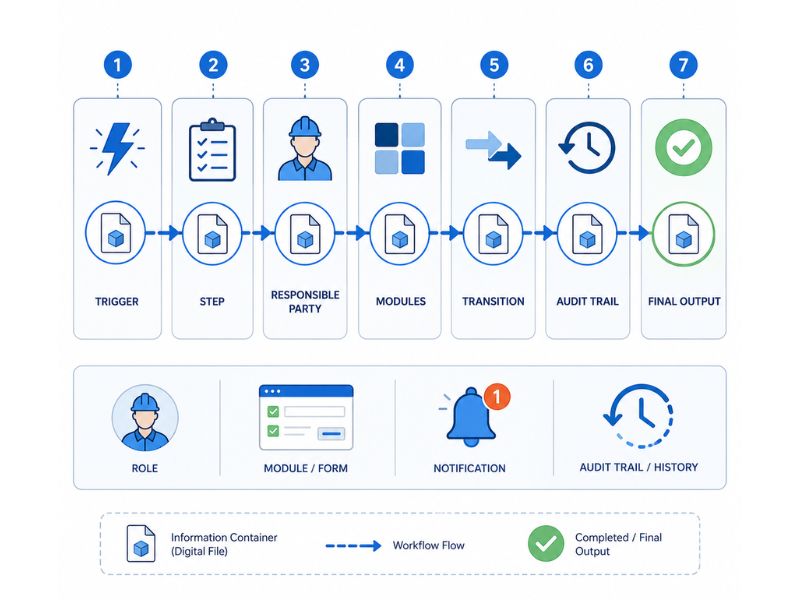
CDE document workflow diagram
The CRA Process: Check, Review, Approve
The operational heart of almost every CDE document workflow is the CRA (Check, Review, Approve) process. It consists of three consecutive phases, each with distinct responsibilities and purposes.
Check — the technical verification
The Check is the first phase. It is a technical verification conducted by the producing Task Team or a designated representative (typically the BIM Coordinator or assigned group). The purpose is to ensure that the information container meets the basic technical requirements before being exposed to other parties.
What is checked in the Check:
- compliance with the naming conventions of the Informative Specification;
- completeness of mandatory metadata;
- presence of all elements required by the LOIN for the phase;
- any automatic validations (e.g. IDS checks on IFC models)
The check is performed by the technical manager of the producing Task Team. If the outcome is positive, the container moves to Review; if the outcome is negative, the container returns to the Task Team for corrections.
Review — the interdisciplinary review
The Review is the phase of interdisciplinary review and coordination. The container — now in Shared status — is exposed to other Task Teams and the main responsible party for verification of consistency with other project containers.
What is checked in the Review:
- interdisciplinary consistency (clash detection if model);
- alignment with other related containers (e.g. consistency between architectural and structural);
- compliance with the requirements of the Informative Specification;
- collection of comments, issues (typically via BCF) and requests for changes.
The review is carried out by other Task Teams, Lead Appointed Party, and possibly the proposing party.
If the outcome is positive, the container moves to Approve; if the outcome is negative, the container returns to the Task Team (rework) with the opened issues.
Approve — the formal approval
The Approve is the final and contractual phase. The container is formally approved by the Appointing Party (or by the Lead Appointed Party if so provided by the Informative Specification) and can transition to Published status.
What is checked in the Approve:
- completeness of the prior CRA process;
- resolution of all opened issues;
- contractual compliance with the Informative Specification;
- suitability for the declared purpose.
The final approval is conducted by the Appointing Party or Lead Appointed Party according to the CI.
If the outcome is positive, the container becomes Published; if the outcome is negative, the container returns to Review or Check depending on the severity of the deficiencies.
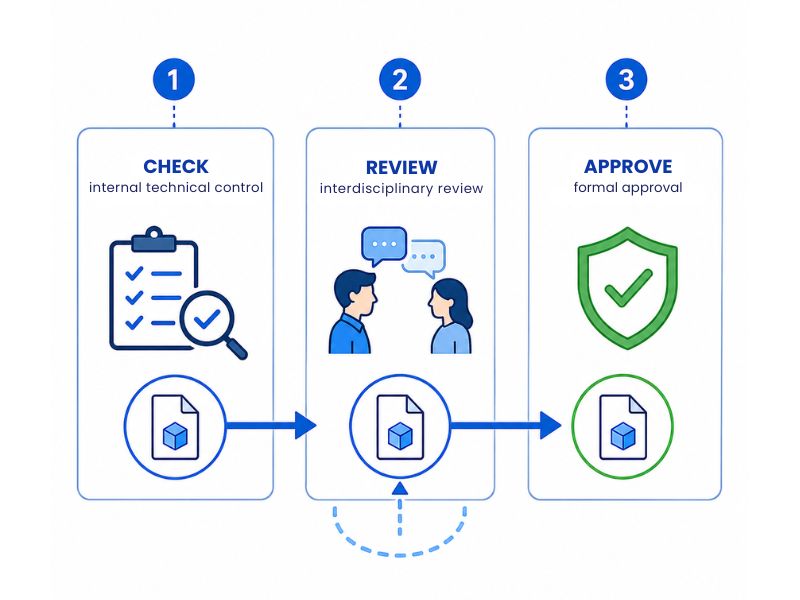
CRA process in the CDE document workflow
“`html
Variations of the CRA process
The classic CRA in three phases is not the only possible scheme. Depending on the nature of the container and the rules of the Information Specification, there can be:
- Simplified CRA: Check + Approve, without interdisciplinary Review (typical for internal documents not subject to coordination);
- Extended CRA: Check + Technical Review + Quality Review + Approve (for critical containers such as structural or plant models);
- CRA with external audit: CRA + third-party verification (for containers subject to external regulatory validation).
Predefined workflows: the organization’s process library
One of the most powerful features of a mature CDE is the ability to define a library of predefined workflows, which are preconfigured process templates according to the standard procedures of the organization.
Why are predefined workflows needed?
Without predefined workflows, each project would redefine the verification and approval procedures from scratch, resulting in three negative consequences:
- inconsistency among projects: each contract would have its own process;
- waste of time: every time the wheel is reinvented;
- risk of non-compliance: without standardization, it’s easy to skip critical steps.
Predefined workflows meet these needs by offering reusable templates, configured according to the organization’s procedures and activated with a simple action.
Examples of typical predefined workflows
A library of predefined workflows in a mature AEC organization may include:
- verification workflow for a disciplinary IFC model (architectural, structural, MEP);
- approval workflow for a technical drawing (floor plan, section, construction detail);
- review workflow for a contractual document (specifications, technical report, timeline);
- testing workflow for a construction element (structural, plant, fire safety);
- handover workflow to Facility Management;
- workflow for managing ongoing changes;
- data validation workflow for sustainability (EPD, LCA, CSRD report).
Configurability vs standardization
The CDE must balance two opposing needs:
- standardization: workflows must be consistent within the organization;
- configurability: workflows must be adaptable to the specificities of each project.
Role-based workflows: standardize without rigidity
The true qualitative leap of a mature CDE is the management of role-based workflows – not based on individuals.
The problem with user-based workflows
A workflow configured for specific users has a structural problem: it is rigid and fragile. If Mario is the structural verifier and goes on vacation, the workflow gets blocked. If Luisa changes roles, the workflow needs reconfiguration. If the project changes hands, everything needs to be reevaluated.
Role-Based Workflows
The solution is to associate each step with a logical function rather than a person. Typical roles include:
- BIM Manager: overall supervision of information management;
- BIM Coordinator: disciplinary coordination;
- CDE Manager: operational management of the environment;
- Information Manager: overall information governance;
- Structural, MEP, Architectural Checker: discipline leaders;
- Appointing Party Representative: client’s representative.
At the start of the workflow, the platform requires associating each role with the correct person within the project team. The template thus remains standardized, while the application is flexible and adaptable.
Operational Advantages
- resilience: if the assigned person is absent, the role-person association can be changed without affecting the workflow;
- scalability: the same template can be applied to dozens of projects with different teams;
- compliance with UNI 11337-7: the Italian standard on BIM roles becomes the semantic framework of the workflows;
- ease of management: operational configuration reduces to a role-person mapping.
Modules Associated with Workflows: Structured Data Collection
An advanced CDE document workflow does not just manage approvals: it collects structured data throughout the process. The mechanism involves modules (digital checklists, verification forms, quality controls) associated with the steps of the workflow.
What are modules?
A module is a structured set of fields – textual, numerical, boolean, multiple choice, with attachments – that collects specific information on an informational container at a given moment in its lifecycle.
Concrete examples:
- structural verification module: filled out by the checker during the Check step, with fields on reference regulations, safety coefficients, compliance with project loads;
- fire testing module: filled out at the end of the construction phase, with fields on REI, compartments, escape routes;
- FM handover module: filled out in the last phase of the project, with technical data for operational management (manuals, maintenance, suppliers, warranties).
Conditional Visibility by Phase
The distinctive feature is conditional visibility: modules can be visible or editable only in certain phases of the workflow, ensuring that each user works exclusively on information relevant to their competence.
The structural verification module is:
- invisible during the WIP phase;
- fillable only by the structural checker during the Check phase;
- read-only visible to Task Teams during the Review phase;
- frozen and consultable after approval.
This allows for managed, controlled, and progressive handling of checks, fillings, and validations, step by step.
Modules as Conditions for Advancement
In more sophisticated workflows, filling out a module becomes a condition for advancement; without the completion of the verification module, the workflow cannot progress. This transforms the modules from simple forms into actual process gates, ensuring that critical data is collected before advancement.
From Single Module to Project Database
The data collected in the modules do not remain isolated within the single container. An advanced CDE aggregates them at the project level, allowing them to be viewed in tabular form, filterable, sortable, and queryable. This is the transition from document management to intelligent information management.
Revision Management: Workflows and New Versions
A often overlooked topic is how an advanced CDE manages the relationship between workflows and revisions of the informational container. What happens when a new version of a file is uploaded while a workflow is ongoing on the previous version?
The Principle: The Workflow Stops, History Remains
When an updated revision of an informational container is uploaded, any ongoing workflow on the previous version is paused in its current state and remains consultable as historical reference. A new process can then start on the new version, in line with the updated content of the file.
This behavior has significant normative and operational value:
- the traceability of the interrupted process is not lost;
- no confusion is created between the workflows of the old and the new version;
- the audit trail maintains complete evidence of what happened with each revision.
Concrete Example
The BIM Coordinator uploads version 02 of a structural model. The verification workflow is activated, proceeding up to the Review step. In Review, inconsistencies with the architectural model are noted and the Task Team decides to revise the model.
They upload version 03. At this point:
- the workflow on version 02 remains “paused in Review,” with all comments and open issues consultable as history;
- a new verification workflow starts on version 03 from the beginning;
- the audit trail records both the partial path of version 02 and the new path of version 03;
- no data is lost, no processes are mixed.
Implications for Platform Choice
Not all platforms manage this scenario correctly. Some overwrite the workflow, others keep it but without linking it to the new version, and others silently delete it. A CDE compliant with ISO 19650 must ensure the correct behavior: tracked interruption, no deletion, permanent consultability of the history.
Recurring workflow patterns in the AEC industry
Over the years, some recurring workflow patterns have solidified that represent recognized best practices. Here are the most common ones.
Pattern 1 — Classic 3-step CRA Workflow
The standard ISO 19650-2 workflow:
- Check (Producer Task Team) → internal technical verification;
- Review (other Task Teams + Lead Appointed Party) → interdisciplinary review;
- Approve (Appointing Party) → formal approval.
This workflow is used for information containers intended for the transition from Shared to Published status, with contractual value.
Pattern 2 — Automated IDS Validation Workflow
It is specific for IFC models:
- upload of the IFC model
- automated IDS validation (automatic trigger)
- manual check if validation is positive
- correction notification if validation is negative
It is advisable to use this workflow for all IFC model type containers in projects adopting IDS standards (recommended for complex BIM projects).
Pattern 3 — Digital Signature Workflow with Timestamp
It is for contractual documents:
- check of the document;
- review by the Lead Appointed Party;
- digital signature by the Appointing Party;
- addition of the timestamp;
- publication with contractual suitability code;
This workflow should be used for information containers with legally relevant contractual value.
Pattern 4 — Structured Rework Loop Workflow
It is for managing iterations:
- main workflow (e.g., CRA)
- if rejected → automatic opening of a correction sub-workflow with:
- assignment to the Producer Task Team;
- list of issues to resolve;
- response SLA;
- verification that all issues have been closed before returning to the main workflow.
This workflow is for complex projects with a high likelihood of iterations (e.g., complex new constructions, infrastructures).
Pattern 5 — Parallel Approval Workflow
When multiple parties must approve simultaneously without sequential dependence:
- upload of the container;
- parallel submission to verifier A + verifier B + verifier C;
- collection of approvals with conflict management;
- final approval only if all have approved.
This workflow is suitable for containers that require multi-disciplinary validation (e.g., a coordination document, a complex variation).
Pattern 6 — Handover Workflow to Facility Management
At the end of the project:
- completeness check on Published containers;
- validation of technical data for FM;
- completion of handover forms (manuals, warranties, maintenance);
- final archiving.
This workflow is for the final phase of the project, the transition from construction to operational management.
Free tool to design your workflows
To concretely apply what has been described, we have prepared two free tools that you can use immediately:
Try the interactive workflow builder: create your customized workflow: add steps, assign roles, associate forms, configure transitions. See the generated flow in real time and download the configuration in a readable format.
How an advanced CDE implements document workflows
Not all CDE platforms manage workflows in the same way. More mature implementations stand out for certain operational features that make a difference in daily use.
Visual Workflow Configuration
An advanced platform allows you to visually configure workflows with a drag & drop editor, modifiable flowcharts, process preview — instead of requiring the writing of complex rules or configuration files. This makes configuration accessible to BIM Managers and CDE Managers without requiring software development skills.
Library of Reusable Workflows
A mature platform offers a library of preconfigured workflows and allows the organization to create its own, save them as templates, and reuse them across multiple projects.
Integration with Structured Forms
The workflow must be able to activate forms at the appropriate steps, with conditional logic (visible, fillable, mandatory). The platform must manage form completion as an integral part of the process, not as a separate function.
Complete and Unmodifiable Audit Trail
Each workflow generates a complete audit trail: who acted, when, with what outcome, with what comments. This log must be immutable — not even the administrator should be able to alter it — and exportable for external audits, disputes, third-party verifications.
Integration with the App Ecosystem
In mature ecosystems, the workflow is not a silo: it integrates with the platform’s specialized apps. An IFC model verification workflow can trigger clash detection, BCF issue tracking, revision comparison, IDS validation. This transforms the workflow into a true process orchestrator.
The CDE as an ecosystem: workflows in the real platforms
In the usBIM ecosystem of ACCA, the management of document workflows is the operational heart of usBIM.platform, the ISO 19650 compliant CDE. Every information container uploaded can activate a workflow, with clear visualization of the progress status, identification of the subjects involved for each step, automatic notifications, associated forms with conditional visibility for phases, and coherent management of revisions with historical records of interrupted workflows.
Around the platform, specialized apps integrate as executable actions within the steps of the workflow:
- usBIM.clash for clash detection activated in the Review step;
- usBIM.bcf for managing issues opened during the Review with the BCF standard;
- usBIM.compare for the automatic comparison between revisions when a new workflow starts;
- usBIM.dataquality for the automatic IDS validation of IFC models complying with the requirements of the fundamental Information Specification for “Pattern 2 (automatic IDS validation)” workflows.
- usBIM.editor for editing documents in the WIP and rework phases.
- usBIM.facility for handover workflows to Facility Management.
The philosophy is to make the workflow not just an approval process, but a conductor of all the technical activities necessary for the production and validation of the information container. A structural verification workflow is not just “someone approves”: it is a sequence of concrete actions (clash, IDS validation, issue tracking, revision comparison, LOIN verification, structural form filling) orchestrated by the platform.
Common mistakes in implementing document workflows
Experience shows that certain mistakes are repeated with alarming frequency. Knowing them helps to avoid them.
- replicating email processes in the CDE: many organizations, at their first approach with the CDE, configure workflows that replicate step by step the existing email processes. The result is an unnecessarily complex workflow, full of redundant steps, which does not exploit the automation capabilities of the platform. The correct strategy is to rethink the process by exploiting the CDE paradigm, not to transcribe it uncritically;
- too rigid workflows: workflows with too many steps, too many mandatory conditions, and too many formal passages tend to generate user frustration and encourage bypassing the system (e.g., users send files via email to “speed things up”). An effective workflow is as simple as possible but not simpler than necessary;
- not defining response times: workflows that do not meet response times and acceptance criteria defined in the EIR and pGI tend to get stuck because “there is no urgency”;
- assignment to individual users rather than roles: as already mentioned, assigning steps to specific users instead of roles produces fragile workflows. This is one of the most common mistakes in the early implementations of a CDE.
- too long or non-mandatory forms: a form with 50 fields is filled out superficially. An optional form is not filled out at all. The best practice is few fields, clearly mandatory, with automatic validation where possible.
- lack of user training: the most sophisticated workflow is useless if users do not know how to use it. The implementation of CDE workflows requires structured training of teams, not just documentation. The ROI of training is very high in the first 3-6 months of adoption;
- no periodic review of the workflows: workflows must be periodically revised based on usage data: where they get stuck, how long they last, which steps generate more rework. Without this iteration, workflows become obsolete and ineffective.
Frequently asked questions (FAQ)
What is a document workflow in a CDE?
A document workflow in an ISO 19650 compliant CDE is a structured operational flow activated by the upload of an information container, guiding verification, review, approval, and data compilation activities. It consists of sequential steps with responsible parties, forms, progress conditions, and automatic notifications, and operationally realizes the CRA (Check, Review, Approve) process regulated by ISO 19650-2.
What is the CRA process (Check, Review, Approve)?
The CRA is the process of verification, review, and approval for the transition of information containers from WIP to Shared to Published:
- check: internal technical verification of the Task Team;
- review: interdisciplinary review;
- approve: formal approval by the Appointing Party. Each phase has responsible parties, progress conditions, and may produce rework towards previous phases.
How is a workflow activated in a CDE?
A workflow in a compliant CDE can be activated by: uploading a new information container, uploading a new revision, manual status change, time expiration, explicit action by a user.
What is the difference between user-based workflows and role-based workflows?
A user-based workflow assigns steps to specific people (e.g., “Mario must approve”). It is rigid: if Mario is absent, the workflow gets stuck. A role-based workflow assigns steps to logical functions (e.g., “the structural verifier must approve”). At the moment of activation, the platform requests to associate the role with the correct person. It is more resilient, scalable, and reusable across projects.
What are the forms associated with workflows?
Forms are structured sets of fields (checklists, verification sheets, checks) associated with the steps of a workflow. They collect structured data throughout the process. In an advanced CDE, they have conditional visibility by phase: they are visible or fillable only in the phases relevant to each user. Forms can be mandatory for the progression of the workflow, acting as process gates.
What happens to the workflow when a new version is uploaded?
When a new version of an information container is uploaded, any ongoing workflow on the previous version is interrupted at its current state and remains accessible as historical reference. A new workflow begins on the updated version, consistent with the new content. The audit trail retains both paths, ensuring full traceability.
Can there be reusable predefined workflows?
Yes. An advanced CDE platform offers a library of predefined workflows — preconfigured templates according to the organization’s procedures — that can be activated with a simple action. The templates are typically parametric: roles and some variables (maximum times, optional forms) are customized at the time of start-up, preserving process standardization and application flexibility.
What are the most common workflow patterns in the AEC sector?
Recurring patterns include: classic three-step CRA (Check, Review, Approve), IDS automatic validation workflow for IFC models, digital signature workflow for contractual documents, rework loop workflow for managing iterations, parallel approval workflow for multi-disciplinary content, handover workflow to Facility Management for the final phase of the project.
How do workflows integrate with CDE specialized apps?
In a mature ecosystem, workflow steps can trigger specialized apps: clash detection, IDS validation, BCF issue tracking, revision comparison, document editing, digital signature. Consequently, the workflow becomes a process orchestrator that coordinates not only approvals but also technical activities. This is the most advanced level of integration.
What is a workflow’s audit trail?
The audit trail is the permanent and unmodifiable record of all actions taken during a workflow: who acted, when, with what outcome, and with what comments. It is the foundation of traceability required by ISO 19650 and is essential for compliance audits, contractual disputes, and third-party checks. A compliant CDE ensures that the audit trail is immutable and exportable.
Is it possible to modify an already initiated workflow?
It depends on the platform and the phase. Generally, an ongoing workflow should not be structurally modified as this would compromise traceability. Some platforms allow minor changes (e.g., replacing the person associated with a role) while maintaining the record. Structural changes typically require closing the workflow and starting a new one.
How is the effectiveness of a workflow assessed?
The effectiveness of a workflow is assessed by analyzing operational metrics: average completion time, number of reworks, percentage of SLAs met, recurring bottlenecks, and workload per role. A mature CDE provides these metrics through the project dashboard, allowing iterations on workflows based on objective data.
Essential Glossary
- Approve – final phase of the CRA process: formal approval of the container by the Appointing Party.
- Audit trail – permanent and unmodifiable record of actions taken during a workflow.
- BCF – BIM Collaboration Format. openBIM standard for issue management.
- Check – First phase of the CRA process: internal technical verification by the producing Task Team.
- CRA – Check, Review, Approve. Verification, review, and approval process governed by ISO 19650-2.
- Process gate – Mandatory condition (e.g., form completion) that must be met for the workflow to advance.
- Form – Structured set of fields associated with a workflow step for collecting structured data.
- Review – Second phase of the CRA process: interdisciplinary review of the container.
- Rework loop – Return path of the container to previous phases after identifying non-conformance.
- SLA – Service Level Agreement. Maximum time defined for completing a step.
- Step – Elementary phase of a workflow, with a responsible person, expected action, and progression condition.
- Workflow template – Preconfigured, reusable, and parametric workflow saved in the organization’s library.
- Transition – Passage from one step to the next in a workflow, determined by an explicit action.
- Trigger – Event that automatically activates a workflow (file upload, review, deadline, etc.).
- Predefined workflow – Preconfigured workflow template according to the organization’s procedures.


