
BCF Cloud: Managing BIM Issues in Real-Time
What is the BCF API, how does it work, and why does it change the openBIM coordination workflow? Discover how to synchronize BIM issues in real-time thanks to the BCF server integrated in the cloud
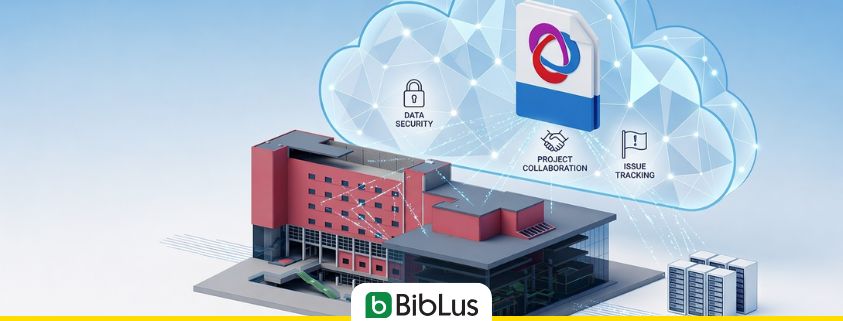
BCF cloud and BCF API in summary
The BCF cloud allows for managing BIM issues in a centralized and always updated environment, overcoming the limits of exchanging .bcf files. The BCF API enables different BIM software to connect to a BCF server and synchronize comments, states, and viewpoints in real-time. The result is more efficient coordination, without version conflicts and with data always aligned among all project participants.
The BCF format has resolved one of the historical problems of BIM coordination: allowing different disciplines to exchange reports, comments, and observations on an IFC model without having to share the entire project file. It is an open standard, mature and widely adopted within the openBIM ecosystem.
Yet, in the daily practice of many teams, BCF continues to generate friction. Not due to a limitation of the format but rather the way it is used. The exchange of BCF files easily leads to working on different versions of the same issue: while one team updates the file, another might still be working on a previous version. The result is a fragmented management of information, where it becomes difficult to maintain the actual state of coordination.
The BCF server was created precisely to solve this. In this article, I will explain what it is, which standard governs it, and what changes concretely in the workflow of those managing issues and BIM coordination.
Contents
- The structural limit of the file-based workflow
- The BCF API: the standard that enables cloud coordination
- BCF cloud Server: from zero configuration to immediate coordination
- BCF File Exchange and BCF Server: the differences at a glance
- What really changes in the workflow with a BCF Server: operational advantages
- BCF files or BCF server: which approach to choose?
- Frequently Asked Questions
The structural limit of the file-based workflow
The classic workflow for managing BIM issues involves someone exporting a .bcf or .bcfzip file, sharing it via email or on a folder, and each team member downloading it, modifying it in turn, and sending it back. A sequential and manual process that works for simple projects, with few actors and few open issues. However, for complex projects, with multidisciplinary teams, multiple disciplines working simultaneously, and dozens of active reports in parallel, this model quickly shows its limits. The concrete risk is having multiple versions of the same BCF file circulating simultaneously: those who downloaded first do not know that in the meantime someone has already closed some issues, and those adding comments do not have the updated status of the reports in front of them. One ends up spending precious time not solving project issues but rather figuring out which version of the file is the “good” one and manually reconstructing the state of coordination.
This is not just a problem of efficiency. It is a problem of the reliability of the BIM process: coordination decisions are made based on potentially outdated data, with issues lost between versions and inconsistent states among participants.
The BCF API: the standard that enables cloud coordination
To understand how a BCF server functions, it is useful to start from the technical standard that makes it possible: the BCF API.
The BCF API is a specification developed and maintained by buildingSMART International, the same organization that manages the IFC standard, bSDD, and the entire openBIM ecosystem. It was created with a precise goal: to overcome the collaboration model based on file exchange and introduce a server-based paradigm, in which issues live in a centralized archive, accessible by all participants in real-time.
From a technical perspective, the BCF API defines a set of standardized REST endpoints: an open communication contract that allows any compatible BIM software to communicate with a BCF server in a structured and interoperable manner. Through these endpoints, it is possible to create new issues, read existing ones, update states and comments, retrieve and save viewpoints. All without exchanging files, without manual steps.
The principle guiding the BCF API is the same that motivated the creation of IFC: no proprietary lock-in. A BCF server compliant with buildingSMART specifications can be queried by Revit, Archicad, Tekla, or any other openBIM tool implementing the BCF API. Data remains open, interoperable, and accessible regardless of the tools used by individual project participants.
It is worth noting that the BCF API also falls within the broader framework of openCDE, the buildingSMART initiative to standardize interoperability between CDE platforms and BIM tools. In that ecosystem, the BCF API is one of the fundamental components to enable the automatic synchronization of issues across different environments. The direction is towards an increasingly interoperable openBIM ecosystem based on shared standards.

BCF cloud
BCF cloud Server: from zero configuration to immediate coordination
Understanding the standard is important. But the question that arises for those who are practically working on a project is: how can I adopt it in practice? The answer is through a BCF cloud server. This is the condition that makes real-time coordination possible, without going through complex configurations and dedicated infrastructures.
In this scenario, usBIM.bcf comes into play, providing a BCF server compliant with the standard, allowing for the adoption of this model without any phase of infrastructural setup. There is no need to install anything, configure servers, or manage IT environments: the system is immediately operational, accessible via browser from any device, and integrated into the cloud ecosystem where IFC models and project documentation are managed.
Once the system is started, the behavior is typical of a BCF server compliant with buildingSMART specifications:
- every modification to the issues is synchronized in real time, without manual updates;
- all team members work on a unique and always up-to-date status of each report;
- the action history is complete and tracked: who did what, when, and why.
In daily work, this translates into concrete operational dynamics:
- the BIM coordinator always has the real state of coordination in front of them, without having to collect and reconcile files from multiple sources;
- the designers intervene on the issues directly within the context of the model, with the associated viewpoint as reference, without intermediate steps;
- the MEP manager checks in real time whether the clash reported the day before has already been taken care of;
- the project manager filters the issues by priority, deadline, or assignee and reads the project status without having to wait for updates from anyone.
BCF File Exchange and BCF Server: the differences at a glance
The table below summarizes the main differences between the two approaches:
| .bcf/.bcfzip File Exchange | BCF Server | |
|---|---|---|
| Synchronization | Manual, sequential | Automatic, in real time |
| Versioning | Risk of conflicting versions | Single centralized version |
| Simultaneous Access | Not natively supported | Everyone works on the same data |
| Traceability | Depends on team discipline | Complete history with author and timestamp |
| Sharing with outsiders | Immediate, just the file | Requires access to the platform |
| Infrastructural Setup | None | None if the server is in the cloud |
| Suitable for | Small teams, punctual collaborations, end-of-project deliveries | Multidisciplinary teams, continuous coordination |
What really changes in the workflow with a BCF Server: operational advantages
The most immediate advantage is the elimination of version conflicts. With a BCF server, there is only one version of each issue, that centralized on the server, and everyone always works with updated data. This eliminates at the root errors, overlaps, and wasted time related to file management.
But the concrete advantages go deeper:
- Faster resolution of critical issues. Real-time feedback allows designers, coordinators, and specialists to intervene immediately. Issues are taken care of and closed more quickly, reducing the risk that design problems go unresolved on-site, where correction costs are much higher.
- Complete and reliable traceability. Every action is recorded with author and timestamp. The issue history becomes a useful operational tool not only for active coordination but also for checks, validations, testing, and reconstructing the decision-making history of a project.
- Unique and integrated working environment. There is no need to switch from one tool to another. Issues, IFC models, and documentation coexist in the same cloud environment, simplifying coordination and reducing operational fragmentation.
- Immediate access, even on-site. Being accessible via browser, the system can be used from any device. On-site, for example, it is possible to check the status of an issue directly on a tablet, with reference to the 3D model and the associated viewpoint.
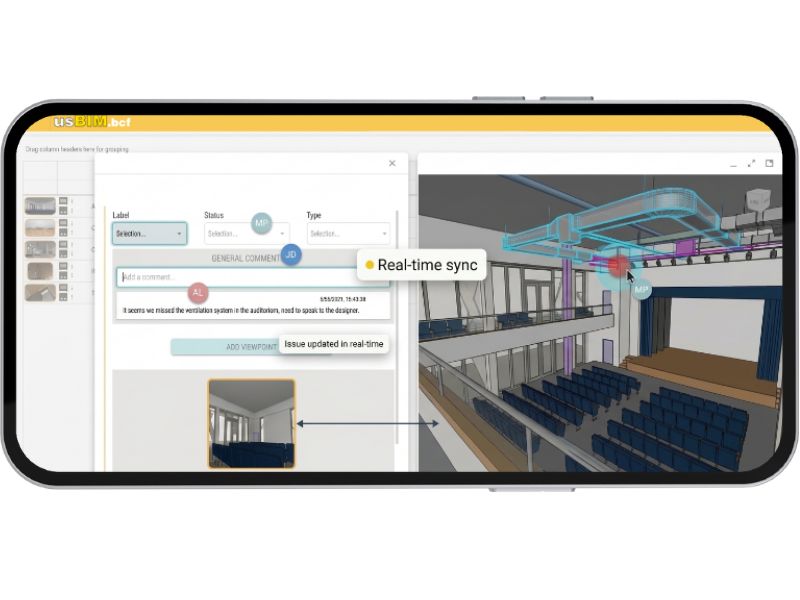
Real Time Collaboration
BCF files or BCF server: which approach to choose?
The two models do not exclude each other. They are complementary approaches that can coexist within the same workflow, to be chosen based on the operational context.
The exchange of .bcf/.bcfzip files remains the most suitable choice when sharing issues with partners or external consultants who do not have access to the platform or when delivering a static archive of reports at the end of the project. Compatibility with the openBIM standard is total.
The BCF server, on the other hand, is the optimal choice for teams that continuously work on the same project and all have access to the platform. In this context, the advantages in terms of speed, quality of coordination, and reduction of errors are considerable.
The choice is not between two conflicting alternatives, but between two tools to use based on the context: one oriented towards external interoperability, the other towards continuous coordination within the team.
The BCF format has already solved the interoperability problem in the exchange of BIM reports. The BCF server takes a step further: it eliminates the file exchange and introduces a coordination model in which all participants always work on the same up-to-date state of the issues, in real-time, from any device and software.
For teams managing complex BIM projects, this is not a marginal upgrade. It is how BIM issue management stops being a reconciliation activity and truly becomes a collaborative process. For those who want to adopt this approach without dealing with infrastructure configurations, it is possible to start immediately by using the BCF cloud server integrated into usBIM.bcf, which offers immediate access through a simple ACCA account.
Frequently Asked Questions
What is the difference between BCF files and BCF servers?
The BCF file (format .bcf or .bcfzip) is a static archive that contains the issues of a project at a given moment: it is exported from one software, shared manually, and imported by another software. The BCF server, on the other hand, is a centralized and dynamic archive: issues are not exchanged as files but reside on a single system accessible by all participants in real-time. The fundamental difference is that with the BCF file, issues “move” from one place to another, while with the BCF server, everyone connects to the same place.
Is the BCF API compatible with all BIM software?
The BCF API is an open standard developed by buildingSMART International, the same body that manages the IFC. Any BIM software that implements the BCF API can connect to a BCF server compliant with the standard, regardless of the vendor. Revit, Archicad, Tekla, and many other tools already support the BCF API in their recent versions. To check the compatibility of your software, you can consult the IFC/BCF certification registry on the official buildingSMART website.
Does it require a dedicated server to use a BCF server?
No, if a cloud solution like usBIM.bcf is adopted. In this case, the BCF server is already hosted and managed by the cloud infrastructure of the provider — in this case, ACCA — and does not require any configuration from the team. No system administration skills are needed, no hardware needs to be purchased or configured, and no updates need to be managed. The team accesses the BCF server simply through a browser, using the same credentials used for the rest of the usBIM platform.
Does the BCF server completely replace the exchange of BCF files?
Not necessarily, and it is not required to do so. The two approaches are complementary. The BCF server is the optimal choice for continuous internal coordination among team members who have access to the platform. The exchange of .bcfzip files remains the right tool for sharing issues with external partners or consultants or for delivering a static archive of reports at the end of the project. A tool like usBIM.bcf supports both modes, leaving the team the choice of which to use based on the context.


